



Smarter PDF Editing and Secure eSignatures with DocHub
Managing documents efficiently is one of the biggest challenges in modern digital work. Businesses, students, freelancers, and remote teams all rely on PDFs for contracts, reports, applications, and daily paperwork. Traditional methods often involve printing, signing by hand, scanning, and emailing files back and forth, which can be time-consuming and inconvenient. DocHub offers a simpler approach by bringing PDF editing, electronic signatures, document sharing, and cloud access together in one online platform.
Simple Online PDF Editing with DocHub

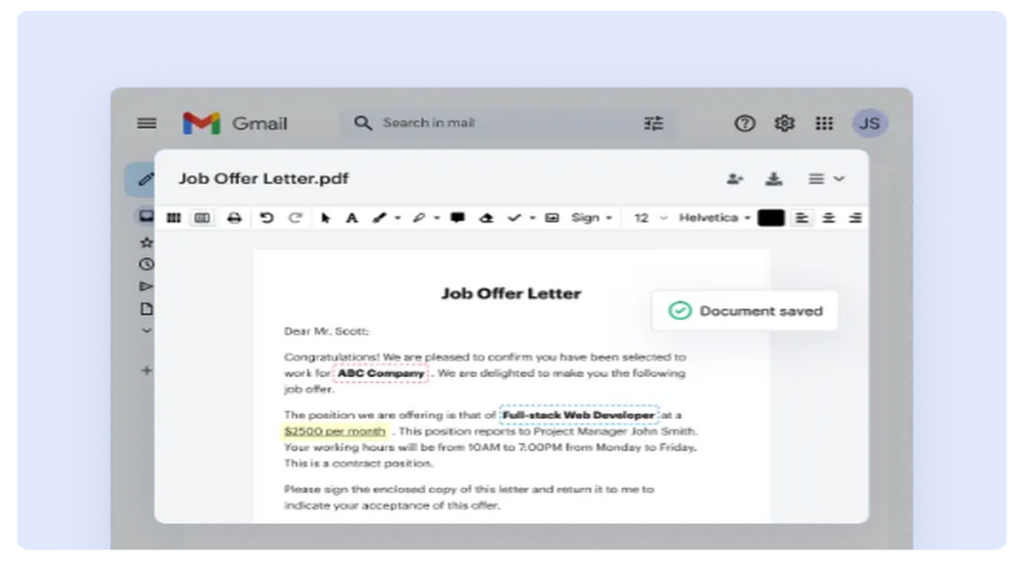
One of the strongest advantages of DocHub is its easy-to-use PDF editor. Users can upload a document directly from their computer or cloud storage and begin editing immediately in a web browser. There is no need to install complicated software or learn advanced design tools.
DocHub allows users to add text, highlight important sections, insert comments, draw shapes, and place images within a PDF. This makes it useful for correcting contracts, completing forms, reviewing business documents, or preparing educational materials. Because the editing tools are accessible online, users can work from different devices without worrying about compatibility issues.
The simplicity of the interface also helps new users become productive quickly. Even someone with limited technical experience can open a document, make changes, and save the updated version within minutes.
Faster Document Approvals with DocHub
Waiting for signatures can slow down important business processes. DocHub helps reduce these delays through built-in electronic signature tools. Users can create a digital signature, place it in the correct location, and send the document for approval almost instantly.
This feature is valuable for employment agreements, client contracts, rental forms, service proposals, and many other types of paperwork. Instead of printing and scanning documents, all parties can complete the signing process online. Faster approvals mean projects can move forward more quickly, clients receive responses sooner, and administrative tasks require less effort.
For organizations that handle a large number of signed documents, electronic signatures can significantly improve workflow efficiency and reduce paper usage.
Secure Cloud-Based Document Management with DocHub
Keeping important files organized is essential for both personal and professional use. DocHub provides cloud-based document management that allows users to store files securely and access them whenever needed. Documents are available from a desktop computer, laptop, tablet, or smartphone with an internet connection.
This flexibility is especially useful for remote work and travel. A user can upload a document at the office and review it later from home or while attending a meeting. Cloud storage also reduces the risk of losing files due to computer damage or accidental deletion.
Organized online storage makes it easier to locate contracts, invoices, reports, and other important documents without searching through multiple folders or email attachments.
Better Team Collaboration Through DocHub
Modern work often involves collaboration between colleagues, clients, partners, or instructors. DocHub supports teamwork by making it easy to share documents and gather feedback in one place. Reviewers can add comments, annotations, and suggestions directly within the file.
This approach reduces confusion caused by multiple document versions and long email conversations. Everyone works from the same document, which helps maintain accuracy and improves communication. Teams can review proposals, approve changes, and finalize documents more efficiently.
Students and educators can also benefit from collaborative document review, making it easier to exchange feedback on assignments, research papers, and classroom materials.
These advantages are particularly helpful for freelancers, consultants, legal professionals, real estate agents, human resources teams, and small business owners who work with documents daily. By simplifying routine paperwork, DocHub allows users to spend more time on higher-value work.
Flexible Access for Remote and Mobile Work with DocHub

Remote and hybrid work environments require tools that function well outside a traditional office. DocHub is designed for browser-based access, which means users can manage documents from almost any device without installing desktop software.
A manager can approve a contract from a tablet, a client can sign an agreement from a smartphone, and an employee can review a report while traveling. This flexibility helps organizations respond quickly to urgent requests and maintain productivity even when team members are working from different locations.
Mobile access also improves customer service because documents can be updated and shared immediately instead of waiting until someone returns to the office.
Why DocHub Supports Modern Digital Workflows
Businesses and individuals are increasingly moving toward paperless workflows, cloud collaboration, and digital approvals. DocHub fits naturally into this transition by providing practical tools for editing PDFs, collecting signatures, sharing documents, and storing files securely online.
For individuals, the platform offers a convenient way to handle personal paperwork without printing documents. For students, it simplifies assignment completion and document review. For businesses, it supports faster approvals, better collaboration, and more organized document management.
The combination of accessibility, security, collaboration, and ease of use makes DocHub a valuable solution for modern document workflows. As digital work continues to grow, tools that reduce administrative effort and improve efficiency become increasingly important. DocHub helps users manage documents more effectively, collaborate with confidence, and keep important files accessible wherever work happens.


